
 Calculating arrival date

HP 651A Toner Guide:
Sets, Singles & Compatible Printers
Find the right set or single cartridge for your HP LaserJet Enterprise 700 color MFP M775. One family. Four essential colors. Compare cartridge numbers, page yields and sealed-box options before choosing your set or single toner.
Find your cartridge ↓
*HP ratings declared under ISO/IEC 19798. Actual yields vary.
By Genuine Ink · November 17, 2026
What is HP 651A toner and which printers use it?
HP 651A is the toner family for HP LaserJet Enterprise 700 color MFP M775 printers. Choose CE340A for black, CE341A for cyan, CE342A for yellow and CE343A for magenta. Buy a four-color set when you need all four, or a single cartridge when just one color needs replacing.
The practical decision is how much toner you need to buy now. Check your exact printer, the color that needs replacing and the selected box condition before comparing prices.
HP 651A cartridge numbers and page yields
“651A” names the family. The full part number identifies the color. For example, CE340A is HP 651A black; it is not the part number for the complete four-color set.
| Color | Original HP cartridge | Approximate yield | In the set |
|---|---|---|---|
| Black | HP 651A Black · CE340A | 13,500 pages | 1 cartridge |
| Cyan | HP 651A Cyan · CE341A | 16,000 pages | 1 cartridge |
| Yellow | HP 651A Yellow · CE342A | 16,000 pages | 1 cartridge |
| Magenta | HP 651A Magenta · CE343A | 16,000 pages | 1 cartridge |
HP publishes these approximate yields under ISO/IEC 19798. They are individual cartridge ratings, not guaranteed output. See HP’s original cartridge-yield report.
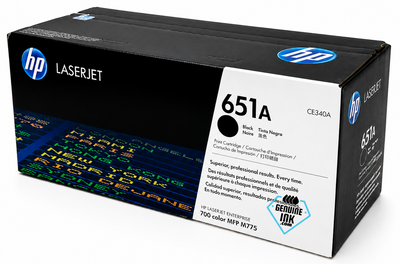
HP 651A Black
CE340A · One original HP cartridge
Approx. 13,500 pages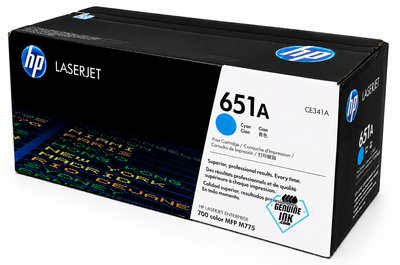
HP 651A Cyan
CE341A · One original HP cartridge
Approx. 16,000 pages
HP 651A Yellow
CE342A · One original HP cartridge
Approx. 16,000 pages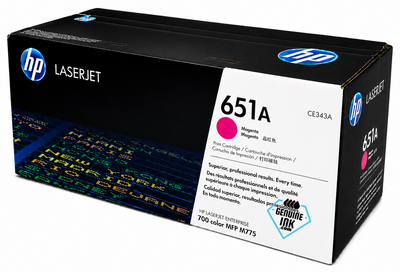
HP 651A Magenta
CE343A · One original HP cartridge
Approx. 16,000 pagesShould you buy an HP 651A four-color set or single cartridges?
The complete four-color set
Choose the set when all four colors need replacement, or when you have a clear need for a spare of every color. One order brings together CE340A, CE341A, CE342A and CE343A.
Compare its current price with the same four singles in equivalent box conditions. A set is convenient, but savings depend on the actual prices.
Shop the HP 651A set →Just the cartridge you need
Choose a single when black or one color runs low before the others. Keep usable cartridges installed and avoid building up spare boxes of colors you rarely replace.
Start with the printer’s supplies status and the part number on your existing cartridge. Buying a set does not mean you must install all four together.
Upfront cost versus useful value
Only black needs replacing? Compare the single black cartridge first. All four are due? Compare the complete set with the total cost of the four singles. The better purchase is the one that covers your real needs at the current price, without unnecessary spares.
HP 651A toner: compatible printers
The following M775 models are listed on Genuine Ink’s HP 651A set page. Each model link opens its supplies page so you can check the match before ordering.
| HP 651A compatible printer | Black CE340A | CE341A / CE342A / CE343A colors |
|---|---|---|
| HP LaserJet Enterprise 700 color MFP M775z+ | Yes | Yes |
| HP LaserJet Enterprise 700 color MFP M775f | Yes | Yes |
| HP LaserJet Enterprise 700 color MFP M775dn | Yes | Yes |
| HP Color LaserJet Managed MFP M775zm | Yes | Yes |
| HP LaserJet Enterprise 700 color MFP M775z | Yes | Yes |
Match the complete name on the printer label. Similar-looking model numbers do not establish compatibility. If your printer is not listed, ask us to help identify its toner before buying.
How long does HP 651A toner last?
The rated figures are approximately 13,500 pages for black and 16,000 pages for each color. Treat them as a comparison baseline, not a calendar or a guaranteed count. A page with dense graphics uses toner differently from a page with a small amount of text.
A four-color set does not equal 61,500 full-color pages
A color page can use several cartridges at once. Adding 13,500 + 16,000 + 16,000 + 16,000 does not describe how many full-color pages you will print. Use the per-cartridge ratings and track your own replacements to plan future orders.
HP publishes an ISO/IEC 19798 yield report for this cartridge family. The color figure is an average composite CMY yield; individual results vary. Learn how HP measures output in its page-yield guidance.
HP 651A newer vs. previous box style: what is the difference?
The part number identifies your toner. The selected packaging option tells you which box to expect. Box style and box condition are different: artwork describes the design; the condition describes the packaging supplied.
Newer box style
See the HP 651A black CE340A box pictured above. When the selected listing option says the box style matches the product photo, this is the packaging design being shown.
“Newer” describes the pictured design, not a guaranteed manufacturing date. Match the cartridge number and read the option description.
Previous box style
On the HP 651A set listing, Previous Box Style means brand-new genuine HP toner in factory-sealed packaging with an earlier HP design.
This is separate from Open Box. Earlier artwork does not change CE340A, CE341A, CE342A or CE343A into a different toner family, and it does not change HP’s rated yield.
There can be more than one earlier design. Compare the selected option description rather than assuming that all HP 651A boxes look identical.
When did HP change the box style?
HP has used different packaging designs over time. A family-specific changeover date for HP 651A has not been verified for this guide. Use the product photo and selected option description to choose the packaging you want.
The box style should not be a surprise.
A low price tells you the cost. It does not tell you which packaging design will arrive. If a seller does not specify the box style, ask before you buy.
At Genuine Ink, when we say “Box style matches the product photo,” we mean it.
Read the description for the option you select. On the HP 651A set listing, Excellent Box and Factory Sealed Box include that photo-match statement; Previous Box Style is identified separately.
Compare HP 651A packaging options →A fun fact about HP 651A’s printer family…
and the not-so-fun part.
HP published a cartridge-yield report for the LaserJet Enterprise 700 color MFP M775 on December 4, 2012. It recorded testing across four printers, using 96 cartridges and standardized test pages. That puts this toner family in a long-established generation of office color printing. Read HP’s original yield test report.
A documented test, not a guess
The M775 report documents standardized testing for the HP 651A family, rather than promising the same output for every document.
About 14 years later
The model’s history is long. But a printer’s age does not tell you what its next toner replacement should cost.
The printer may be paid for. The toner bill keeps coming.
Keeping a useful printer can make sense, but every replacement still deserves a price check. Buying four colors each time only black runs out can leave you with money sitting on the shelf in unused boxes.
Make the next order fit the printer’s actual needs: compare HP 651A black CE340A when black needs replacing, or the complete HP 651A set when you need all four. Compare equivalent sealed-box conditions and use the calculator below to put the current price in perspective.
The price-history comparison below adds two published price snapshots to this printer-family history.
HP 651A toner prices over time: what should you compare?
If you have used a M775 for years, an old toner invoice may look very different from a replacement quote today. The printer still needs the same cartridge numbers, but every new order deserves a fresh price check.
HP 651A: 2015 published prices versus 2026 HP prices
HP’s June 2015 brochure lists estimated U.S. street prices. The two examples below compare those figures with prices displayed on HP’s U.S. store pages retrieved on November 17, 2026: $89 more for black (+51.7%) and $225 more for magenta (+52.0%). These are published-price snapshots, not a year-by-year history.
| Original HP cartridge | Part number | 2015 published price | 2026 HP selling price* | Dollar increase | Percent increase |
|---|---|---|---|---|---|
| HP 651A black | CE340A | $171.99 | $260.99 | +$89.00 | +51.7% |
| HP 651A magenta | CE343A | $432.99 | $657.99 | +$225.00 | +52.0% |
Source: HP Fast Finder, June 2015, page 2. Its footnote identifies estimated U.S. street prices and says “For HP Tier 1 accounts only.” These are not verified launch MSRPs.
*2026 source: prices displayed in HP’s U.S. store pages retrieved November 17, 2026; each price links to its cartridge. This compares different published price types, not MSRP to MSRP. Prices can change. USD per single cartridge, before tax and shipping; not adjusted for inflation.
Cyan and yellow are not included in this comparison because a reliable current HP U.S. selling price was not verified. Dollar increase = 2026 price minus 2015 price. Percentage increase = dollar increase ÷ 2015 price × 100, rounded to one decimal place.
The useful lesson: compare the cartridge, not just the old price
You can keep buying original HP toner without assuming every seller charges the same amount. Compare the same part number, equivalent box condition and current price. Buy the colors you actually need instead of automatically replacing all four.
Explore the HP 651A set or the individual cartridges, then use our cost-per-page calculator with today’s selected sealed-box price. Genuine Ink prices are a separate shopping comparison, not a measure of HP’s historical increases.
What is the cost per page for HP 651A toner?
Enter the current price of one sealed-box cartridge below. Use the actual selected box-condition price from its product page. The result covers that cartridge’s toner only, excluding tax, paper and maintenance.
Black · 13,500 rated pages
Price ÷ 13,500 × 100 = cents per rated page.
Check the black cartridge price →One color · 16,000 rated pages
Price ÷ 16,000 × 100 = cents per rated page for that color only.
Prices fluctuate. No fixed selling prices are assumed here. A single-color estimate is not the total toner cost of a full-color page. Do not enter a four-color set price into a single-cartridge calculation.
For broader planning, visit our printing-cost and page-yield calculator.
Three checks before you order HP 651A
- Confirm the printer. Read the complete Color LaserJet model from its label and use the compatibility table above.
- Confirm the color and part number. Black is CE340A; cyan is CE341A; yellow is CE342A; magenta is CE343A.
- Compare like-for-like packaging. Select the box condition on each product page. If you want sealed packaging, compare sealed options, including a previous box style only when the listing confirms it is sealed.
Keep spare cartridges in their protective packaging until needed and follow HP’s storage instructions. An older printer can still need attention beyond toner; replacing a cartridge is not a cure for every paper-feed or print-quality problem.
Why buy HP 651A toner from Genuine Ink?
Our name reflects what we sell: genuine, original-brand ink, toner and printer supplies. This guide links directly to original HP 651A cartridges, with a clear choice between a complete set and the single color you need.
Review each listing’s current price, packaging option and printer fit. If the numbers are confusing, contact Genuine Ink with your printer model and cartridge number.
HP 651A toner questions, answered
What toner does an HP LaserJet Enterprise 700 color MFP M775 use?
The HP LaserJet Enterprise 700 color MFP M775 family uses HP 651A cartridges: CE340A black, CE341A cyan, CE342A yellow and CE343A magenta. Match your exact model before ordering.
Does HP 651A fit the M775dn, M775f, M775z and M775z+?
Yes. HP 651A is listed for the LaserJet Enterprise 700 color MFP M775 family, including M775dn, M775f, M775z and M775z+. Use the printer links above to check supplies for your model.
Is CE340A the same as HP 651A?
CE340A identifies the black cartridge in the HP 651A family. The name 651A alone does not identify a color; cyan, yellow and magenta have different part numbers.
What comes in the HP 651A set?
The Genuine Ink HP 651A set contains four original HP toner cartridges: one black CE340A, one cyan CE341A, one yellow CE342A and one magenta CE343A.
Do I need to replace all four HP 651A cartridges together?
No. Replace the cartridge that needs replacement and keep the other usable cartridges installed. A complete set is an ordering option, not a requirement to change every color at once.
How many pages does HP 651A print?
HP rates black CE340A at approximately 13,500 pages and each color cartridge at approximately 16,000 pages, declared under ISO/IEC 19798. Actual output varies. Do not add the four ratings to calculate full-color pages.
Is a four-color set always cheaper than buying singles?
Not necessarily. Compare the current set price with the total for the individual cartridges you need, using equivalent box conditions. Buying extra colors you will not use can tie up more money even when a bundle has a lower per-cartridge price.